



Laptops and tablets shape the way you work, study and unwind. Whether you need a full keyboard and large screen for juggling a busy workday or a slim touch screen to watch the latest series on your commute, picking the perfect device makes everything easier. From emails and video calls to streaming and education, the right device fits into almost every part of your day.
Choosing your ideal laptop or tablet comes down to performance, battery life, portability and how you plan to use it day to day. This guide cuts through the noise so you can find the device that genuinely fits the way you work.
Thinking of Buying a Tablet or Laptop so You Can Claim It at Tax Time?
Here’s what you need to know: if you use a laptop or tablet for work, you may be able to claim it as a tax deduction. Items $300 or less can be claimed immediately, while items over $300 are claimed over time as they decline in value. If you also use your device for personal use, such as for studying or streaming TV shows, you can only claim the work-related portion. Keep your receipts and records so you’ll be prepared come tax time.

Not sure where you stand? Talk to a registered tax agent or contact the Australian Taxation Office before lodging your return.
What’s the Difference Between a Laptop and a Tablet?
People buy laptops and tablets for portable computing; they can go wherever you go, but they’re built for different things. It really comes down to how you want to get things done.
Laptops deliver more processing power, a full keyboard and a larger screen, making them ideal for work, study or anything needing a bit more oomph.
Tablets are lighter, thinner and more compact, so they're perfect for browsing, streaming and everyday tasks you want to knock over from the couch or on your commute. They’re also renowned for being kid-friendly because of their intuitive touch, simple parental controls and being easy to hold for smaller hands.
Still struggling to decide? If you need a reliable setup for longer work sessions or demanding programs, go with a laptop. If portability and simplicity top your list, tablets are tough to beat.

What Key Things Should I Consider When Deciding on a Laptop or Tablet?
Performance: Laptops are built to handle demanding tasks like editing documents and juggling multiple windows and apps. Tablets are great for browsing, streaming and everyday productivity.
Storage and Memory: Measured in gigabytes (GB) or terabytes (TB), storage capacity refers to the amount of internal space a device has for files and apps, while RAM (random access memory) is the short-term data storage for apps you’re actively using. The more RAM a device has, the better it can handle multitasking and using several apps at once. Laptops generally have more storage capacity and RAM than tablets.
Portability: Both tablets and laptops are designed to be portable, but tablets are generally lighter and easier to carry.
Upgrades: Laptops offer slightly more room to grow over time, given you can upgrade the hardware, such as adding extra internal storage. Both laptops and tablets receive regular software updates to keep your device secure and running smoothly.
Battery Life: Tablets typically have strong battery life for daily use. Laptops vary depending on the model and how hard you work them, so it’s worth checking the specs before you buy.
SEE ALSO: My Tech Must-Haves with Katherine Sabbath
Best Laptops For EOFY
Best Versatile Laptop: HP 14” Omnibook Flip 5 Core 5 16/512GB 2 in 1 Laptop

Screen size: 14 inches
Battery life: Up to 15 hours*
Resolution: 1920 x 1200 pixels
Weight: 1.62kg
Can’t decide between a laptop and a tablet? You can have the best of both worlds with the HP OmniBook 5’s 360-degree hinge, which lets you type, swipe, sketch or stream the way you like.
The Intel Core 5 processor with 16GB of RAM handles everyday multitasking comfortably, while up to 15 hours of battery means charging is rarely on your mind. At 1.62kg, it’s reasonably portable, and connectivity’s covered with Wi-Fi 6, Bluetooth 5.4, USB-C and HDMI ports.
Best Laptop for Screen Size: Asus 15.6" Vivobook 15 Core 7 16/1TB Laptop
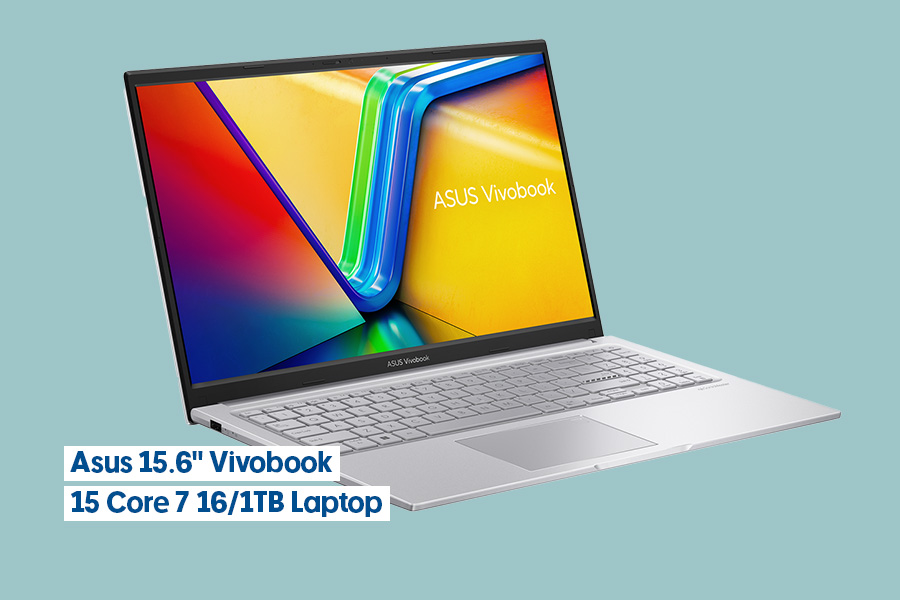
Screen size: 15.6 inches
Battery life: Up to 10 hours*
Resolution: 1920 x 1080 pixels
Weight: 1.7kg
If you’re after a laptop with generous screen real estate for your day-to-day tasks, the Asus Vivobook 15 has you covered. The large 15.6-inch full-high-definition display gives you enough room to work across multiple windows.
The Intel Core 7 processor and 16GB of RAM deliver serious power for juggling multiple tasks at once, and with 1TB of storage, you won’t stress about running out of space for your files, photos and projects. It’s equipped with all the connectivity essentials, including USB-C, two USB 3.2 ports and HDMI, so you can easily plug in your favourite devices and accessories.
Best Slimline Laptop: Lenovo 15.3" IdeaPad Slim 3 Core i7 16/512GB Laptop
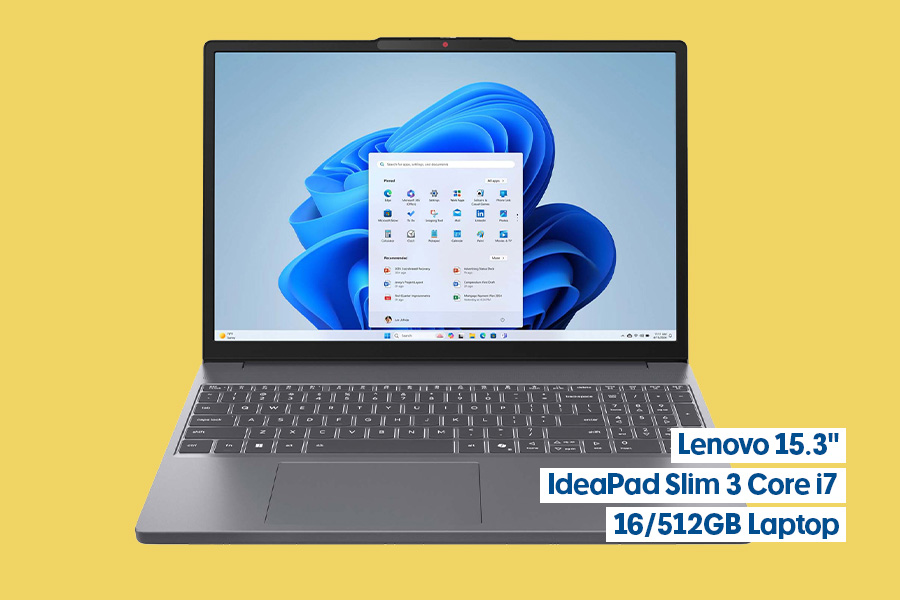
Screen size: 15.3 inches
Battery life: Up to 14.5 hours*
Resolution: 1920 x 1200 pixels
Weight: 1.59kg
Whether you’re dashing between meetings or working from your favourite cafe, the Lenovo IdeaPad Slim 3 is the perfect travel companion. Its lightweight design won’t weigh you down, while its generous 15.3-inch anti-glare display means you can work comfortably even in bright environments.
With the Intel Core i7 processor and 16GB RAM, there’s enough power and memory to breeze through your tasks, from jumping between document edits to hopping into video meetings. Plus, its AI-powered noise cancellation feature ensures you’re heard clearly on video calls, even when you’re working from bustling spaces. With up to 14.5 hours of battery life, you can power through your to-do list without needing to scramble for your charger.
Best Laptop for Storage: Lenovo Ideapad 5 2-in-1 Copilot+ PC Snapdragon X Plus 24/1TB

Screen size: 14 inches
Battery life: Up to 21.5 hours*
Resolution: 1920 x 1200 pixels
Weight: 1.49kg
This Lenovo IdeaPad Slim 5 is a storage powerhouse. With 1TB of internal storage, you'll have plenty of space for everything from work documents and family photos to video files and software, and its 24GB of RAM means you can have multiple apps open at once without any slowdown.
Its Qualcomm Snapdragon X Plus processor will allow you to tackle everyday projects with ease while bringing enhanced AI capabilities to help you work smarter, and its stunning 14-inch OLED display will bring your content to life with vibrant colours and sharp clarity. Plus, with an impressive 21.5-hour battery life, it will effortlessly take you from your workday straight into your evening entertainment, whether you’re streaming your favourite shows or catching up with family and friends online.
SEE ALSO: Tech Devices for Work and Play
Best Hybrid Laptop: Microsoft Surface Pro Copilot+ PC 12" X Plus 16/512GB Slim Pen Bundle

Screen size: 12 inches
Battery life: Up to 16 hours*
Resolution: 2196 x 1464 pixels
Weight: 1kg
With the Surface Pro Keyboard and Slim Pen 2 included, the Microsoft Surface Pro 12 bundle has everything you need to start creating, scrolling and navigating tasks with ease. Its 12-inch PixelSense touch screen is sharp and responsive, while the 165-degree kickstand offers genuine flexibility, allowing you to adjust to the ideal angles for typing, viewing and drawing.
With 16 hours of battery life, this lightweight device will easily get you through a day of work or study with power to spare for enjoying your downtime entertainment. Plus, its built-in Copilot AI assistant is there to help boost your productivity and creativity, and the pen charges right in the keyboard tray, so it’s always ready when inspiration strikes.
Best Affordable Laptop: HP 14" Chromebook Laptop N100 4/64GB

Screen size: 14 inches
Battery life: Up to 12 hours*
Resolution: 1366 x 768 pixels
Weight: 1.45kg
If you spend most of your time browsing online or working in cloud-based apps, the HP Chromebook 14 is the perfect affordable, no-fuss laptop that still covers all the essentials. It runs ChromeOS, which means it’s built for browser-based apps and Google apps, such as Gmail, Docs and Drive. While it has 64GB of local storage on board, it’s enabled to store most of your files in Google Drive, a cloud-based storage service, so you’ll be able to access them from other devices.
Its 12-hour battery life is a standout feature, easily getting you through your daily study or work session on a single charge. Plus, it has Gemini AI built in to help you tackle everything from planning your week to drafting emails.
Best Laptop for Battery Life: Asus Zenbook A14 Copilot+ PC Snapdragon X Plus 16GB/512GB

Screen size: 14 inches
Battery life: Up to 32 hours*
Resolution: 1920 x 1200 pixels
Weight: 999 grams
If you’re tired of hunting for power outlets wherever you go, the Asus Zenbook A14 is your answer. Weighing in at under 1kg, this ultra-portable laptop won’t weigh you down, while its Ceraluminium frame gives it a premium, durable finish that’ll stand up to the bumps and knocks of daily life.
The 14-inch OLED display is a step above most delivering vibrant, crisp visuals that’ll make everything from spreadsheets to streaming look fantastic, and the 1080p webcam will ensure sharp, reliable video calls. The Qualcomm Snapdragon X Plus chip with 16GB RAM handles everyday tasks with ease and its 32-hour battery life will allow you to work, study or play for days without needing a power up. It's got plenty of connectivity options too, with two USB-C ports, USB 3.2 and HDMI.
Best Tablets for EOFY
Our Favourite: Samsung Galaxy Tab A11+ WiFi 128GB Grey
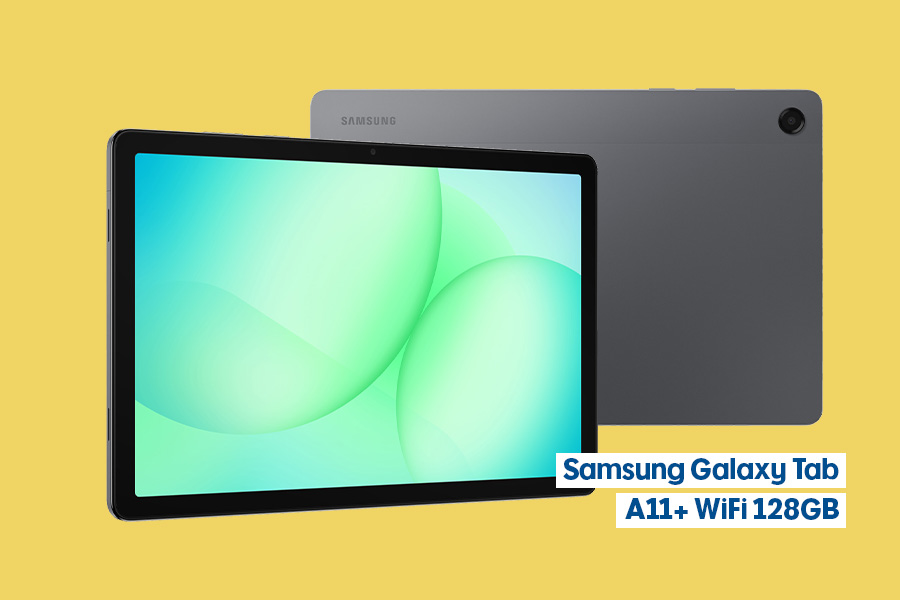
Screen size: 11 inches
Resolution: 1920 x 1200 pixels
Battery life: Up to 10 hours*
Weight: 477g
Camera: 8MP rear, 5MP front
The Samsung Galaxy Tab A11+ is a smooth performer. Its 11-inch display gives you plenty of screen real estate for streaming your favourite shows or browsing online, while its 90Hz refresh rate means everything from scrolling through social media to flicking between apps feels seamless.
The built-in Google Gemini AI integration is a handy helper for note-taking, summarising and productivity tasks. If you love your entertainment, you’ll appreciate the quad-Dolby speakers that bring your music and movies to life with rich, immersive sound. With 6GB of RAM and 128GB of storage, it’s got the space and power to handle your day-to-day needs.
Best Family Tablet: Lenovo Idea Tab Pro 12.7” 8GB/256GB Tablet + Pen
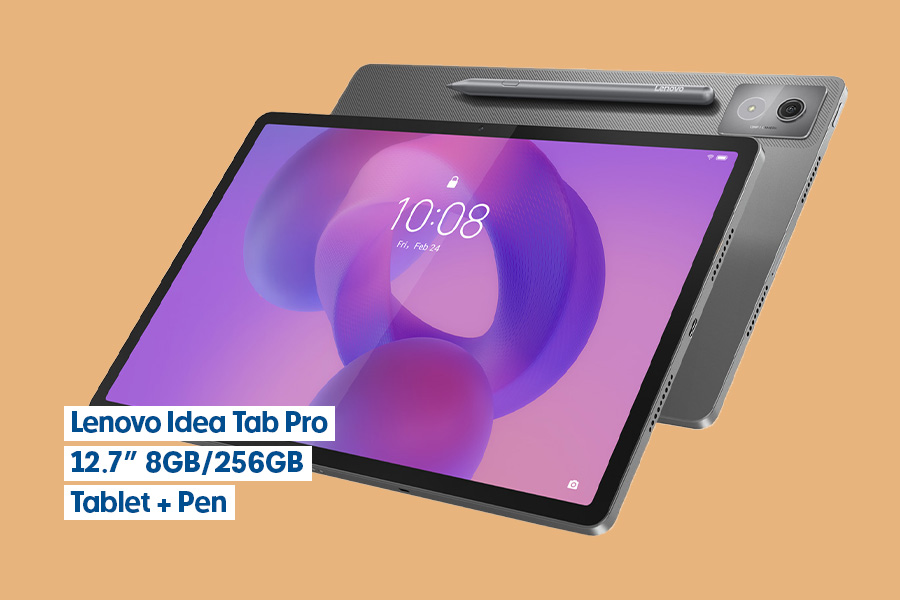
Screen size: 12.7 inches
Resolution: 2944 x 1840 pixels
Battery life: Up to 11 hours*
Weight: 615 grams
Camera: 13MP rear, 8MP front
When you need a device that works for everyone, the Lenovo Idea Tab Pro delivers. Its 12.7-inch display with stunning 3K resolution and a matte finish reduces glare, making it easy on the eyes for any activity or task – whether the kids are working through homework or you’re catching up on work emails.
Google Gemini AI integration helps with everything from research for school assignments to prepping presentations for the office. At 615 grams, it’s light enough for little hands to carry or to slip into your bag without weighing you down. Plus, the included Lenovo Tab Pen Plus is handy for writing notes, marking up documents or letting the kids sketch out their ideas.
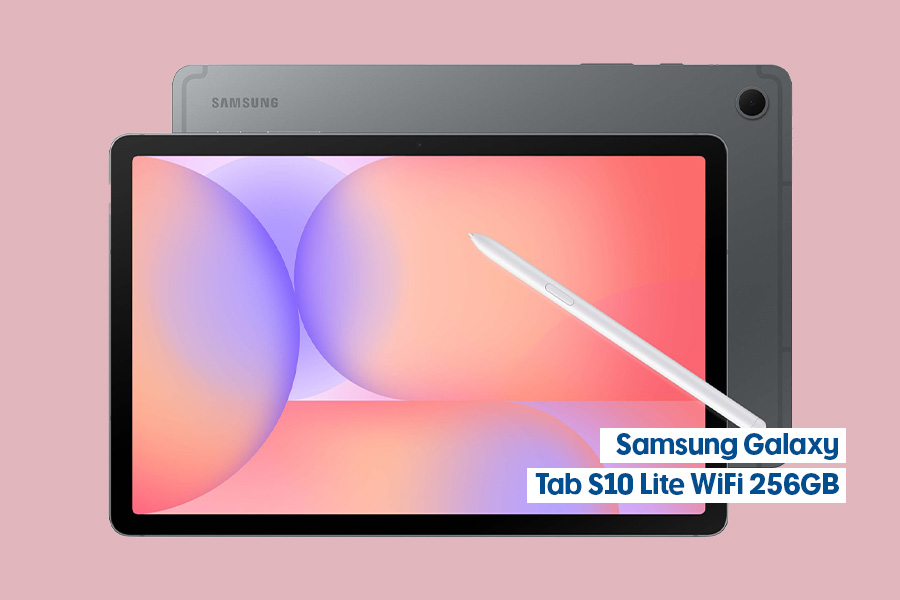
Best Lightweight Tablet: Samsung Galaxy Tab S10 Lite WiFi 256GB Grey
Screen size: 10.9 inches
Resolution: 2112 x 1320 pixels
Battery life: Up to 15 hours*
Weight: 222 grams
Camera: 8MP rear, 5MP front
The Samsung Galaxy Tab S10 Lite keeps things simple in all the right areas. The 10.9-inch display is clear and comfortable for reading, studying, meetings or watching video, and with up to 15 hours of battery, you won’t be disrupted by a low power warning in the middle of your day.
The included S Pen is perfect for jotting down quick notes, sketching out ideas or marking up documents on the fly, and 256GB of storage gives you plenty of room for files, apps and media. Built-in AI features help you search and translate on the go, making it a well-balanced, practical choice for office workers or students who want to get more done.
SEE ALSO: Make Your Device Last: Screen Protectors, Battery Life and More
Best Tablet for Reading: TCL NXTPAPER 11 Plus Tablet 11.5" 8/256GB Dark Grey

Screen size: 11.45 inches
Resolution: 2200 x 1440 pixels
Battery life: Up to 13 hours*
Weight: 490 grams
Camera: 8MP rear, 8MP front
Love getting lost in a good book or article but finding screen time takes its toll on your eyes? The TCL NXTPAPER 11 Plus is here to change that. The 11.45-inch display uses NXTPAPER 4.0 technology to create the look and feel of paper, making long reading sessions noticeably easier on your eyes. AI scene detection automatically adjusts brightness, contrast and colour temperature so the screen always feels comfortable, whatever you’re reading.
There’s built-in writing assistance, handwriting conversion and real-time translation, helping you stay productive without switching between apps. Plus, with its 13-hour battery life and lightweight 490-gram design, you can take it anywhere your day leads you.
This is general information only and does not constitute taxation or legal advice. Other requirements under the tax law apply. Seek professional financial and/or legal advice to determine the right outcomes for your business or individual needs.
*Battery life/run time is an indicator and estimated based on supplied brand’s testing environments. Actual battery life may vary, and is dependent on various factors including loaded applications, configuration, features, usage, network and settings. Battery run times quoted are typically results of benchmark testing by brands. Refer to the specific brand’s website for specific testing conditions.
